
SQL Joins Explained: A Beginner-Friendly Guide with Examples, Pitfalls, and Interview Prep
If you’ve ever worked with databases, you’ve probably heard about SQL joins. Joins are how we combine data from multiple tables into a single result—and they’re essential for unlocking the true power of relational databases.
**Introduction**
If you’ve ever worked with databases, you’ve probably heard about SQL joins. Joins are how we combine data from multiple tables into a single result—and they’re essential for unlocking the true power of relational databases. But let’s face it: joins can feel confusing at first. In this guide, we’ll break them down using plain language, practical examples, and even tackle common mistakes and tricky interview questions. Let’s dive in!
---
### **What Are SQL Joins?**
Imagine you have two tables:
- A `customers` table with columns like `customer_id` and `name`.
- An `orders` table with `order_id`, `customer_id`, and `amount`.
To find out which customers placed orders, you’d **join** these tables using the shared `customer_id` field. Joins let you stitch related data together.
---
### **Types of Joins (with Analogies)**
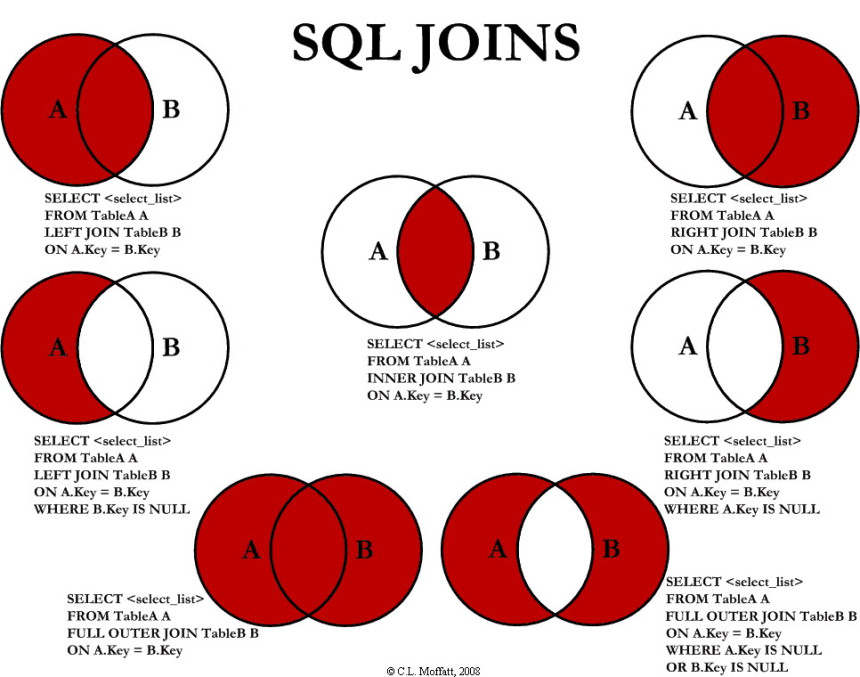
Here’s a simple way to visualize each join type:
#### 1. **INNER JOIN**
- **What it does**: Returns only rows where there’s a match in **both** tables.
- **Analogy**: A guest list for an exclusive party. Only people on *both* the "VIP" and "RSVP" lists get in.
- **Example**:
 SELECT customers.name, orders.amount
 FROM customers
 INNER JOIN orders
  ON customers.customer_id = orders.customer_id;
#### 2. **LEFT JOIN (or LEFT OUTER JOIN)**
- **What it does**: Returns **all rows from the left table** and matched rows from the right table. Unmatched rows show `NULL`.
- **Analogy**: A project task list. All tasks are shown, even if no one is assigned yet.
- **Example**:
 SELECT customers.name, orders.amount
 FROM customers
 LEFT JOIN orders
  ON customers.customer_id = orders.customer_id;
#### 3. **RIGHT JOIN**
- Mirror image of LEFT JOIN. Returns all rows from the *right* table. Rarely used—most people stick with LEFT JOIN.
#### 4. **FULL OUTER JOIN**
- **What it does**: Combines *all* rows from both tables, filling in `NULL` for unmatched sides.
- **Analogy**: Merging two contact lists into one master list.
- **Example**:
 SELECT customers.name, orders.amount
 FROM customers
 FULL OUTER JOIN orders
  ON customers.customer_id = orders.customer_id;
#### 5. **CROSS JOIN**
- **What it does**: Returns every possible combination of rows (a Cartesian product).
- **Use case**: Generating test data or pairing products with sizes.
- **Example**:
 SELECT shirts.color, pants.style
 FROM shirts
 CROSS JOIN pants; -- All shirt-pant combos!
#### 6. **SELF JOIN**
- **What it does**: Joins a table to itself (e.g., finding employees and their managers).
- **Example**:
 SELECT emp.name AS employee, mgr.name AS manager
 FROM employees emp
 LEFT JOIN employees mgr
  ON emp.manager_id = mgr.employee_id;
---
### **Common Mistakes to Avoid**
1. **Forgetting the `ON` Clause**:
- Without it, you’ll get a CROSS JOIN (millions of rows!). Always double-check your join conditions.
2. **Ambiguous Column Names**:
- If two tables have the same column name (e.g., `id`), use aliases:
   SELECT orders.id, customers.id
   FROM orders
   JOIN customers ON orders.customer_id = customers.id;
   -- Error! Use aliases like orders.id AS order_id.
3. **Mixing Up LEFT JOIN and INNER JOIN**:
- LEFT JOIN includes all left rows; INNER JOIN only matches. Accidentally using INNER JOIN can exclude data you need.
4. **Ignoring NULLs in Outer Joins**:
- When using LEFT JOIN, filter NULLs carefully:
   SELECT *
   FROM customers
   LEFT JOIN orders ON ...
   WHERE orders.amount IS NULL; -- Finds customers with NO orders!
5. **Performance Issues**:
- Joining large tables without indexes can be slow. Always optimize your database!
---
### **Tricky Interview Questions**
1. **“How do you find customers who have never placed an order?”**
- **Answer**: Use a LEFT JOIN and filter for `orders.order_id IS NULL`.
2. **“What’s the difference between WHERE and ON in a JOIN?”**
- **Answer**: `ON` defines how tables are linked. `WHERE` filters the final result. But in INNER JOINs, they can sometimes be interchangeable.
3. **“How would you join three tables?”**
- **Example**: Join `customers` → `orders` → `order_items`:
   SELECT *
   FROM customers
   INNER JOIN orders ON customers.id = orders.customer_id
   INNER JOIN order_items ON orders.id = order_items.order_id;
4. **“Explain the ‘Exclusive LEFT JOIN’.”**
- **Answer**: A LEFT JOIN that excludes matches (e.g., rows in A not in B). Use `WHERE table_b.id IS NULL`.
5. **“Why might a JOIN create duplicate rows?”**
- **Answer**: If the joined tables have multiple matching rows (e.g., a customer with 5 orders will appear 5 times). Use `DISTINCT` or aggregate functions to fix this.
---
### **Final Tips**
- **Practice with Real Data**: Try platforms like LeetCode or create your own tables.
- **Visualize Joins**: Draw Venn diagrams or sketch tables on paper.
- **Master Aliases**: They make your code cleaner and prevent errors.
Joins are a superpower for working with relational data. With practice, you’ll breeze through even the trickiest SQL questions. Happy querying! 🚀

How do you execute raw SQL queries in Entity Framework?
How do you execute raw SQL queries in Entity Framework?
The term 'gcc' is not recognized as the name of a cmdlet, function...
The term 'gcc' is not recognized as the name of a cmdlet, function... C , C++ compiler n...